Wednesday, 18 July 2018

Setup DNS server on OEL/Linux

In this post, I am going to share the steps for setup of DNS server. It will be used in my for RAC 12c setup.

Pre-req:

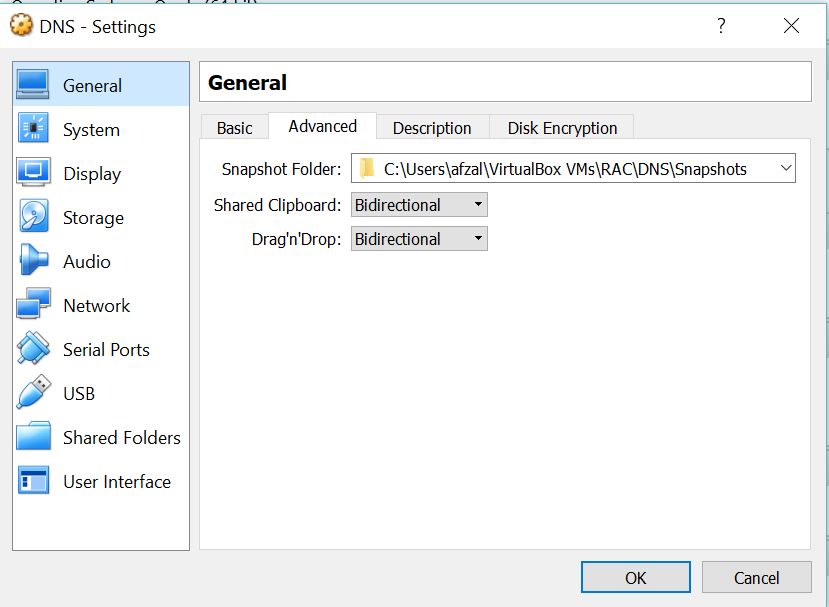
Virtual Box is installed and a Machine is prepared. Below is the configuration of the machine.

Virtual DNS OS Configuration:
RAM: 1GB
HardDisk Size : 12 GB

Operating System: Oracle Enterprise Linux

The installation of the Server would be a basic installation with Option selected as Software Development Workstation to get a GUI. Once the OS installation is done you can optionally install Guest Addition as it helps for easy mouse movements and sharing a file from host system to this guest virtual system.

IPADDR=192.168.56.101
GATEWAY=255.255.255.0
NETMASK=255.255.255.0


High level Steps to configure DNS Server.

  • ·         Install DNS Package
  • ·         Assign static IP to the server
  • ·         Assign FQDN(Fully Qualified Domain Name) for server
  • ·         Configure /etc/hosts
  • ·         Configure /etc/resolv.conf        
  • ·         Configure /etc/named.conf
  • ·         Configure Forward and reverse zone
  • ·         Change the group ownership  of Forward and reverse zone file
  • ·         Restart DNS Server.
  • ·         Change permission of the resolv.conf

1- Installation of the DNS server (BIND)

 From the command line issue the following command.
         # yum install bind-libs bind bind-utils


   2-Assign static IP

     
cd /etc/sysconfig/network-scripts
I am using my adapter 2 so I have changed the entry in eth1.
Change ifcfg-eth1 file and add below entry
  
cd /etc/sysconfig/network-scripts
vi ifcfg-eth1

BOOTPROTO=static
IPADDR=192.168.56.101
GATEWAY=255.255.255.0
NETMASK=255.255.255.0
 3-Assign FQDN for server

  Add any fully qualified name which you want to give.  

 vi /etc/sysconfig/network
 NETWORKING=yes
 HOSTNAME=path.labs

4-Change /etc/resolv.conf


Change /etc/resolv.conf and also change it permission so that it will be not overwritten once server is restarted.
This resolv.conf entry has to be made on all the client systems as well.

[root@path network-scripts]# cat /etc/resolv.conf
# Generated by NetworkManager
search path.labs
nameserver 192.168.56.101

Permission change
chattr +i resolv.conf

5-Change /etc/named.conf  File
    
Edit the contents of the "/etc/named.conf" file. Depending on the setup you require, you may need to make lots of changes, or none at all. For my home network I use "path.lab" as my domain and the IP range "192.168.56.*", so this is what I will show here.
We are adding both forward and reserve lookup

I will show lines which needs to be updated 

listen-on port 53 { 127.0.0.1;192.168.56.101; };
allow-query     { any; };

and I will show lines which needs to be add

zone "path.labs" IN {
        type master;
        file "path.labs.zone";
        allow-update { none; };
};

zone "56.168.192.in-addr.arpa." IN {
        type master;
        file "56.168.192.in-addr.arpa";
        allow-update { none; };
};


    6-Create Forward and Reverse zone files

     Create forward and reverse lookup file

cd  /var/named  touch      56.168.192.in-addr.arpa       path.labs.zone

Add below entry in respective files.

[root@path named]# cat path.labs.zone

$TTL    86400
@               IN SOA  localhost root.localhost (
                                        42              ; serial (d. adams)
                                        3H              ; refresh
                                        15M             ; retry
                                        1W              ; expiry
                                        1D )            ; minimum
                IN NS           localhost
localhost       IN A            127.0.0.1
path   IN A    192.168.56.101


root@path named]# cat 56.168.192.in-addr.arpa


$ORIGIN 56.168.192.in-addr.arpa.
$TTL 1H
@       IN      SOA     path.labs.     root.path.labs. (      2
                                                3H
                                                1H
                                                1W
                                                1H )
56.168.192.in-addr.arpa.         IN NS      path.labs.
101     IN PTR  path.labs.

 7-Change Ownership of the forward and reverse file.

cd /var/named
chown named:named 56.168.192.in-addr.arpa path.labs.zone

    8-To Make sure Bind is started every time server is   restarted.

chkconfig named on
Restart named
service named restart

9-Check if DNS is working fine

[root@path named]# nslookup path
Server:             192.168.56.101
Address:          192.168.56.101#53

Name:  path.path.labs
Address: 192.168.56.101

[root@path named]# nslookup 192.168.56.101
Server:             192.168.56.101
Address:          192.168.56.101#53

101.56.168.192.in-addr.arpa      name = path.labs.


Thursday, 30 April 2015

Oracle tablespace management

Below query to find out possible savings from each data files of Database

set verify off
column file_name format a50 word_wrapped
column smallest format 999,990 heading "Smallest|Size|Poss."
column currsize format 999,990 heading "Current|Size"
column savings  format 999,990 heading "Poss.|Savings"
break on report
compute sum of savings on report
column value new_val blksize
select value from v$parameter where name = 'db_block_size';
/
select file_name,
       ceil( (nvl(hwm,1)*&&blksize)/1024/1024 ) smallest,
       ceil( blocks*&&blksize/1024/1024) currsize,
       ceil( blocks*&&blksize/1024/1024) -
       ceil( (nvl(hwm,1)*&&blksize)/1024/1024 ) savings
from dba_data_files a,
     ( select file_id, max(block_id+blocks-1) hwm
         from dba_extents
        group by file_id ) b
where a.file_id = b.file_id(+) order by savings desc
/

Script from notes to generate the queries to resize the data files:

select 'alter database datafile'||' '''||file_name||''''||' resize '||round(highwater+2)||' '||'m'||';' from (
select /*+ rule */
   a.tablespace_name,
    a.file_name,
   a.bytes/1024/1024 file_size_MB,
    (b.maximum+c.blocks-1)*d.db_block_size/1024/1024 highwater
from dba_data_files a        ,
     (select file_id,max(block_id) maximum         
      from dba_extents         
      group by file_id) b,
      dba_extents c,
     (select value db_block_size         
      from v$parameter         
      where name='db_block_size') d
where a.file_id=  b.file_id
and   c.file_id  = b.file_id
and   c.block_id = b.maximum
order by a.tablespace_name,a.file_name);

Monday, 10 March 2014

Aix Tar command

1-  tar cvf - rman | gzip > rman.tar.gz

2- gunzip < rman.tar.gz | tar xvf -

3-  tar cvf - rman | gzip > /d01/oracle/abc.tar.gz

4- gunzip < /d01/rman.tar.gz | tar xvf -

5- tar cvf  /d01/rman.tar  rman

6- tar cvf rman.tar

clean lock session

find locked session

SELECT SID, serial, seconds_in_wait,
        oracle_username, os_user_name, object_name object_locked,locked_mode
      FROM   (SELECT   sess.SID, sess.serial# serial, lo.oracle_username,
                       lo.os_user_name, ao.object_name, lo.locked_mode,
                       sess.seconds_in_wait
                  FROM v$locked_object lo, dba_objects ao, v$session sess
                 WHERE ao.object_id = lo.object_id
                       AND lo.session_id = sess.SID
              ORDER BY seconds_in_wait DESC)


clean lock session

DECLARE
   v_sid                           NUMBER;
   v_serial                        NUMBER;
   v_seconds_in_wait               NUMBER;
   v_stmt                          VARCHAR2 (500);
   v_lock_time_wait_sec   CONSTANT NUMBER (3)     := 100;

   CURSOR c_data
   IS
      SELECT SID, serial, seconds_in_wait
        /*oracle_username, os_user_name, object_name object_locked,locked_mode, seconds_in_wait*/
      FROM   (SELECT   sess.SID, sess.serial# serial, lo.oracle_username,
                       lo.os_user_name, ao.object_name, lo.locked_mode,
                       sess.seconds_in_wait
                  FROM v$locked_object lo, dba_objects ao, v$session sess
                 WHERE ao.object_id = lo.object_id
                       AND lo.session_id = sess.SID
              ORDER BY seconds_in_wait DESC)
       WHERE ROWNUM <= 5;
BEGIN
   FOR xx IN c_data
   LOOP
      DBMS_LOCK.sleep (1);

      BEGIN
         v_stmt :=
               'alter system kill session '
            || CHR (39)
            || xx.SID
            || ','
            || xx.serial
            || CHR (39);

         IF xx.seconds_in_wait > v_lock_time_wait_sec
         THEN
            EXECUTE IMMEDIATE v_stmt;
         END IF;
      EXCEPTION
         WHEN OTHERS
         THEN
            NULL;
      END;
   END LOOP;
EXCEPTION
   WHEN NO_DATA_FOUND
   THEN
      NULL;
   WHEN OTHERS
   THEN
      raise_application_error (-20001, SQLERRM);
END;

Thursday, 23 May 2013

Switchover from primary to standby

1. Check switchover status before switching database.

SQL>select switchover_status from v$database;
You must see “TO_STANDBY” as result.
Otherwise
2. SQL>alter system switch logfile;

3. Switch primary database to standby database.
SQL>alter database commit to switchover to physical standby with session shutdown;
 SQL>shutdown immediate;
 SQL>startup nomount;
 
4.SQL>alter database mount standby database;
 
Defer for archive log apply. Because I didn’t set my standby database as primary yet.
 
5. SQL>alter system set log_archive_dest_state_2=defer;
 
 
Switch standby database to primary. Check switchover status before switching database

Thursday, 2 May 2013

Upgrade of Oracle Applications Version R12.1.1 to R12.1.3 on AIX

Upgrade of Oracle Applications Version R12.1.1 to R12.1.3 on AIX

Required patches:
p9239089_R12.AD.B_R12_LINUX.zip
p10349415_R12.AD.B_R12_GENERIC.zip (Optional) (leave it)
·                    p9239090_R12_AIX64-5L_1of6.zip
·                    p9239090_R12_AIX64-5L_2of6.zip
·                    p9239090_R12_AIX64-5L_3of6.zip
·                    p9239090_R12_AIX64-5L_4of6.zip
·                    p9239090_R12_AIX64-5L_5of6.zip
·                    p9239090_R12_AIX64-5L_6of6.zip
p9239095_R12_GENERIC.zip

p9822544_R12.MSC.B_R12_GENERIC.zip (Optional) (leave it)
Post update patches are:
p9966055_R12.FND.B_R12_GENERIC.zip
p9817770_R12.ATG_PF.B_R12_AIX64-5L.zip
The following information will provide up gradation process for Ooracle Applications R12.1.1 to R12.1.3.

Step1: Run adadmin and put Maintenance Mode
Step2: Apply Prerequisite R12.AD.B.DELTA.3 Patch 9239089
Do the following Tasks before going to apply the Patch R12.AD.B.DELTA.3 Patch 9239089
Run the adgrants.sql script as a user that can connect as SYSDBA to grant privileges to selected SYS objects and create PL/SQL profiler objects.
Usage:
1.Create $ORACLE_HOME/appsutil/admin on the database server.
2. Copy adgrants.sql (UNIX) from this patch directory to $ORACLE_HOME/appsutil/admin.Or, copy adgrants_nt.sql (Windows) from this patch directory to %ORACLE_HOME%\appsutil\admin.

3. Set the environment to point to ORACLE_HOME on the database server.

4. Use SQL*Plus to run the script:
UNIX:
$ sqlplus /nolog
SQL> @$ORACLE_HOME/appsutil/admin/adgrants.sql <APPS schema name>
Step3: Apply R12.AD.B_R12_GENERIC.zip Patch 10349415(leave it)

Step4: Apply Oracle E-Business Suite Release 12.1.3 Patch 9239090

Step5:. Apply Oracle E-Business Suite Online Help for 12.1.3 Release Update Pack patch 9239095 (leave it)

Step6:.Apply Patch 9822544 for Advanced Supply Chain Planning. (Optional).This patch fixes the issue of collecting resource requirements of OPM batches WIP warehouse does not belong to resource warehouse. (Leave it)

Step7: Apply post Update Patches:
Apply mandatory Patch 9817770 (9817770:R12.ATG_PF.B [POST-R12.ATG_PF.B.DELTA.3 CONSOLIDATEDPATCH].)
–Apply mandatory Patch 9966055 (9966055:R12.FND.B [TRANSLATED VERSION OF FNDSCSGN NOT LAUNCHED].)

Notice
After you have upgraded to Oracle E-Business Suite Release 12.1.3, perform the following post-update steps to update all database tier nodes with the code level, provided by Oracle E-Business Suite Release 12.1.3
Step8: Run Application and Database Environment files.
@Application Tier:
·        Run AutoConfig on the APPL_TOP.
·        Run the admkappsutil.pl utility to create the file appsutil.zip in the <INST_TOP>/admin/out directory.


Perl <AD_TOP>/bin/admkappsutil.pl

If scripts directory is not exist in oracle_home/appsutil

Perl adbldxml.pl template=/d01/oracle/GREENTC/db/tech_st/11.1.0/appsutil/template/adxdbctx.tmp out=/d01/oracle/GREENTC/db/tech_st/11.1.0/appsutil/greentc_sfxd5.xml

adconfig.sh contextfile=/d01/oracle/GREENTC/db/tech_st/11.1.0/appsutil/greentc_sfxd5.xml appspass=greenapps

@Database Tier:
Copy or FTP the appsutil.zip file to the <RDBMS ORACLE_HOME>. Uncompress appsutil.zip under the <RDBMS ORACLE_HOME>.
·        cd <ORACLE_HOME>
·        unzip -o appsutil.zip
·        Run AutoConfig on the <RDBMS ORACLE_HOME>.
Step9:. Run adpreclone.pl on the database tier and the application tier
·        perl adpreclone.pl dbTier
·        perl adpreclone.pl appsTier
Step10: Disable Maintenance Mode using adadmin and check the version using following sql statement.
SQL> select release_name from fnd_product_groups;
RELEASE_NAME
--------------------------------------------------
12.1.3

After up gradation of R12.1.1 and open the form then below error is occurs--


APP-FND-01926:THE CUSTOM event WHEN-RESPONSIBILITY-CHANGED raised unhandled exception ORA-200000 ORA-01722 INVALID NUMBER

The above Error solve by following query
There is no need to run this query where multi org are setup, then direct run the 2nd query.

Query 1

declare
var boolean;
begin
var :=  fnd_profile.SAVE('ORG_ID','102','SITE',NULL,NULL,NULL);
--from dual;
--return var;
end;
if the error is not solve then apply following query
Query 2
declare
var boolean;
begin
var :=  fnd_profile.SAVE('FND_MO_INIT_CI_DEBUG','N','SITE',NULL,NULL,NULL);
--from dual;
--return var;
end;

or
DECLARE
stat boolean;
BEGIN
dbms_output.disable;
dbms_output.enable(100000);
stat := FND_PROFILE.SAVE('FND_MO_INIT_CI_DEBUG',' ','SITE');
IF stat THEN
dbms_output.put_line( 'Stat = TRUE - profile updated' );
ELSE
dbms_output.put_line( 'Stat = FALSE - profile NOT updated' );
END IF;
end;


Wednesday, 17 April 2013

Refresh clone R12 Database from Production

UPDATE CLONE FROM PROD
use prod pfile with
change path according to clone and add log_file_name_convert,db_file_name_convert parameter

1- sqlplus>startup nomount pfile='/d01/oracle/FIN/db/tech_st/11.1.0/dbs/refresh.ora';
2-rman target /
rman>restore controlfile from '/sw/oracle/cont.bkp';
rman>alter database mount;
rman>catalog backuppiece '/backup/oracle/ and 'database backup' and 'archivelog backup'
or
rman>CATALOG START WITH '/sw/oracle';
RMAN>CATALOG START WITH '/backup/oracle' NOPROMPT;

3-run rman restore script;
run
{
SET UNTIL SEQUENCE  260 THREAD 1;
set newname for datafile 1 to '/d01/oracle/oradata/system01.dbf';
set newname for datafile 2 to '/d01/oracle/oradata/system02.dbf';
set newname for datafile 3 to '/d01/oracle/oradata/system03.dbf';
set newname for datafile 4 to '/d01/oracle/oradata/system04.dbf';
set newname for datafile 5 to '/d01/oracle/oradata/system05.dbf';
set newname for datafile 6 to '/d01/oracle/oradata/system06.dbf';
set newname for datafile 7 to '/d01/oracle/oradata/system07.dbf';
set newname for datafile 8 to '/d01/oracle/oradata/system08.dbf';
set newname for datafile 9 to '/d01/oracle/oradata/system09.dbf';
set newname for datafile 10 to '/d01/oracle/oradata/system10.dbf';
set newname for datafile 11 to '/d01/oracle/oradata/system11.dbf';
set newname for datafile 12 to '/d01/oracle/oradata/undo01.dbf';
set newname for datafile 13 to '/d01/oracle/oradata/a_archive01.dbf';
set newname for datafile 14 to '/d01/oracle/oradata/a_int01.dbf';
set newname for datafile 15 to '/d01/oracle/oradata/a_media01.dbf';
set newname for datafile 16 to '/d01/oracle/oradata/a_nolog01.dbf';
set newname for datafile 17 to '/d01/oracle/oradata/a_queue01.dbf';
set newname for datafile 18 to '/d01/oracle/oradata/a_queue02.dbf';
set newname for datafile 19 to '/d01/oracle/oradata/a_ref01.dbf';
set newname for datafile 20 to '/d01/oracle/oradata/a_ref02.dbf';
set newname for datafile 21 to '/d01/oracle/oradata/a_summ01.dbf';
set newname for datafile 22 to '/d01/oracle/oradata/a_txn_data01.dbf';
set newname for datafile 23 to '/d01/oracle/oradata/a_txn_data02.dbf';
set newname for datafile 24 to '/d01/oracle/oradata/a_txn_data03.dbf';
set newname for datafile 25 to '/d01/oracle/oradata/a_txn_ind01.dbf';
set newname for datafile 26 to '/d01/oracle/oradata/a_txn_ind02.dbf';
set newname for datafile 27 to '/d01/oracle/oradata/a_txn_ind03.dbf';
set newname for datafile 28 to '/d01/oracle/oradata/a_txn_ind04.dbf';
set newname for datafile 29 to '/d01/oracle/oradata/a_txn_ind05.dbf';
set newname for datafile 30 to '/d01/oracle/oradata/ctxd01.dbf';
set newname for datafile 31 to '/d01/oracle/oradata/odm.dbf';
set newname for datafile 32 to '/d01/oracle/oradata/olap.dbf';
set newname for datafile 33 to '/d01/oracle/oradata/owad01.dbf';
set newname for datafile 34 to '/d01/oracle/oradata/portal01.dbf';
set newname for datafile 35 to '/d01/oracle/oradata/sysaux01.dbf';
set newname for datafile 36 to '/d01/oracle/oradata/apps_ts_tools01.dbf';
set newname for datafile 37 to '/d01/oracle/oradata/a_txn_data4.dbf';
set newname for datafile 38 to '/d01/oracle/oradata/sfx.dbf';
restore database;
switch datafile all;
recover database;
}
4-alter redolog file rename
alter database rename file  '/d01/oracle/PROD/apps_st/data/log04a.dbf' to '/d01/oracle/oradata/log04a.dbf';
alter database rename file  '/d01/oracle/PROD/apps_st/data/log04b.dbf' to '/d01/oracle/oradata/log04b.dbf';
alter database rename file  '/d01/oracle/PROD/apps_st/data/log03a.dbf' to '/d01/oracle/oradata/log03a.dbf';
alter database rename file  '/d01/oracle/PROD/apps_st/data/log03b.dbf' to '/d01/oracle/oradata/log03b.dbf';
alter database rename file  '/d01/oracle/PROD/apps_st/data/log02a.dbf' to '/d01/oracle/oradata/log02a.dbf';
alter database rename file  '/d01/oracle/PROD/apps_st/data/log02b.dbf' to '/d01/oracle/oradata/log02b.dbf';
alter database rename file  '/d01/oracle/PROD/apps_st/data/log01a.dbf' to '/d01/oracle/oradata/log01a.dbf';
alter database rename file  '/d01/oracle/PROD/apps_st/data/log01b.dbf' to '/d01/oracle/oradata/log01b.dbf';

5-alter database open resetlogs;

6-change database name
1-shutdown immediate
2-delete controlfile
3-startup nomount pfile='/d01/oracle/FIN/db/tech_st/11.1.0/dbs/initsfxfin.ora';
4-craete controlfile
5-alter database open resetlogs;
 
7-create tablespace
set path /u01/oracle/DEV/inst/apps/fintest_report/admin/scripts
6- FNDCPASS apps/mobileforu 0 Y system/manager SYSTEM APPLSYS greeenapps
7- AUTOCONFIGs